Installation guide
Installing OrderVet
OrderVet installs in one click from your platform's app marketplace. There's no separate signup — installing provisions your OrderVet account automatically and opens the app right in your store admin.
On this page
Install from BigCommerce
- In the BigCommerce App Marketplace, search for OrderVet and open the listing.
- Click Install.
- Review the requested access and click Confirm. OrderVet requests read-only access to Orders and Customers — nothing more.
- OrderVet opens inside your BigCommerce control panel, ready to screen. Your account is created automatically; there's nothing else to set up.
Install from Shopify
- In the Shopify App Store, open the OrderVet listing and click Add app.
- In your Shopify admin, click Install and approve the requested access (read-only Orders and Customers).
- OrderVet opens embedded in your Shopify admin. Your account is created automatically on first open.
What you'll see after install
OrderVet opens on the Screen an order page. The form comes pre-filled with a sample order so you can preview a full memo before connecting anything — just click Screen.
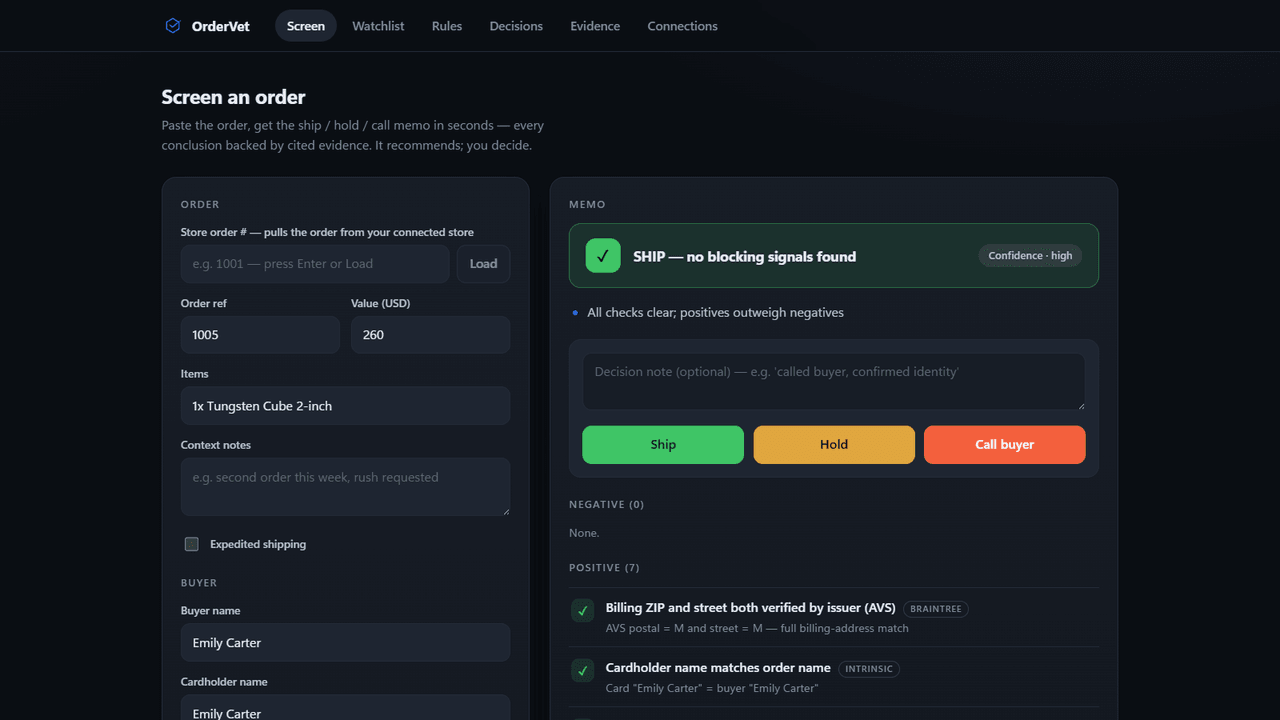
Screen orders from your store
Once installed, you can pull any order straight from your store — no retyping. On the Screen page, type an order number into Store order # and click Load. OrderVet fills in the buyer, billing and shipping addresses, items, value, and the customer's IP, then you click Screen.
Permissions & data
OrderVet requests read-only access to Orders and Customers so it can pull the order you ask it to screen. It never cancels, refunds, or edits orders. OrderVet scores the transaction, not the person: it builds no reusable consumer profile and sells no data, and any decision record you archive is your own and deletable anytime. Stored store credentials are encrypted at rest.
For the full details, see our Privacy Policy and Terms of Service.
Uninstalling
Remove OrderVet from your platform's app management screen (BigCommerce: Apps → My Apps → Uninstall; Shopify: Settings → Apps and sales channels → Uninstall). Uninstalling immediately revokes OrderVet's access to your store.
Next: read the User guide to learn how to screen orders and record decisions.